It’s official: the lifespan of SSL/TLS certificates will be reduced to 47 days

It's official: the lifespan of SSL/TLS certificates will be reduced to 47 days

On 9 October 2024, Apple announced at the CA/B Forum (Certification Authority Browser Forum) its intention to reduce the maximum duration of public SSL/TLS certificates to 45 days by 2027, as well as to reduce the DCV challenge reuse period to 10 days by 2027.

This request was then discussed and amended six months later, again by Apple, which proposed a change to the initial schedule with a reduced certificate duration of 47 days for SSL/TLS certificates and a DCV challenge validation period of 10 days from 15 March 2028.

This measure officially comes into force following the CA/B Forum vote in April 2025, which adopted a new implementation schedule, officially reducing the validity of certificates to 47 days and thus promoting automation for the proper management of these certificates.

  • Until 15 March 2026, the maximum TLS certificate lifetime will remain at 398 days.
  • From 15 March 2026, the maximum TLS certificate lifetime will be 200 days.
  • From 15 March 2027, it will be reduced to 100 days.
  • And from 15 March 2029, the maximum TLS certificate lifetime will be reduced to 47 days.
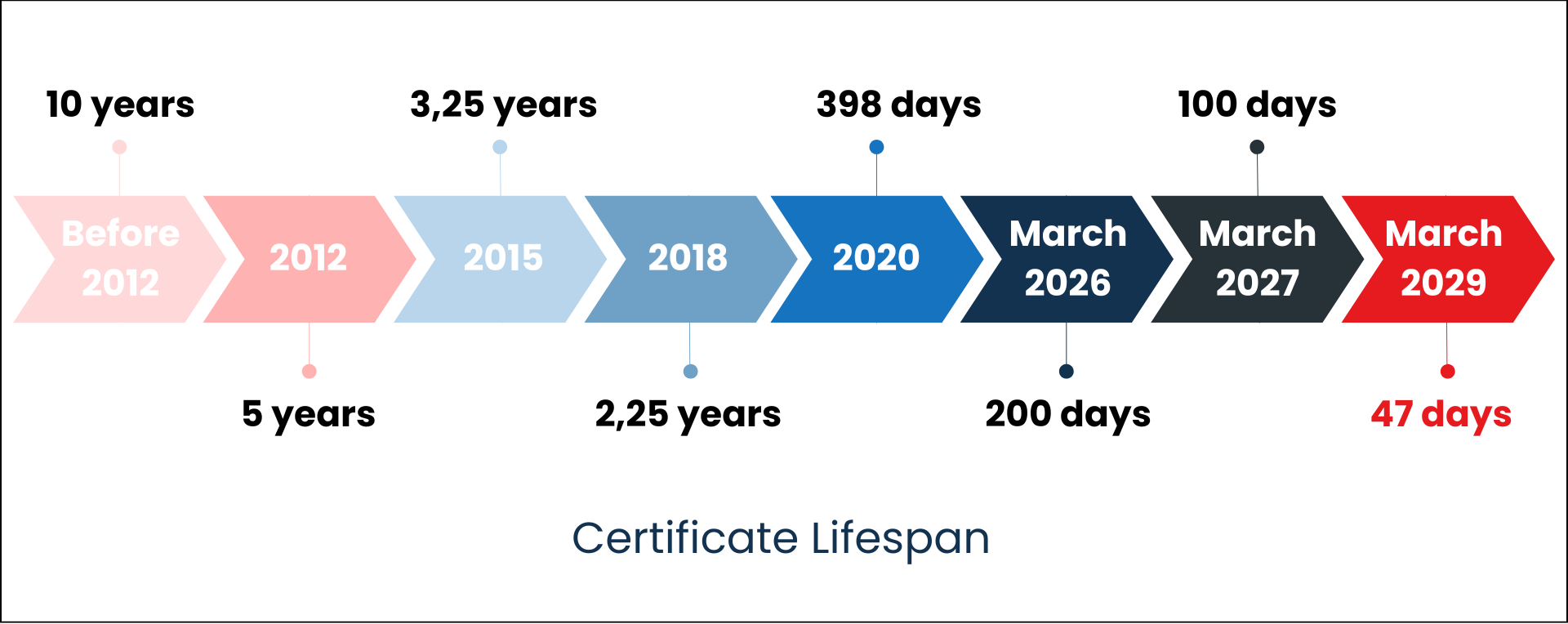
At the same time, the reuse periods for Domain Control Validation (DCV challenge), which involve intervening in the domain name zone listed in the certificate to validate it, will be aligned with the certificate schedule, reaching 10 days in 2029.

  • Until 15 March 2026, the maximum period during which domain validation information can be reused is 398 days.
  • From 15 March 2026 onwards, the maximum period during which domain validation information can be reused is 200 days.
  • From 15 March 2027 onwards, the maximum period during which domain validation information can be reused is 100 days.
  • From 15 March 2029 onwards, the maximum period during which domain validation information can be reused is 10 days.
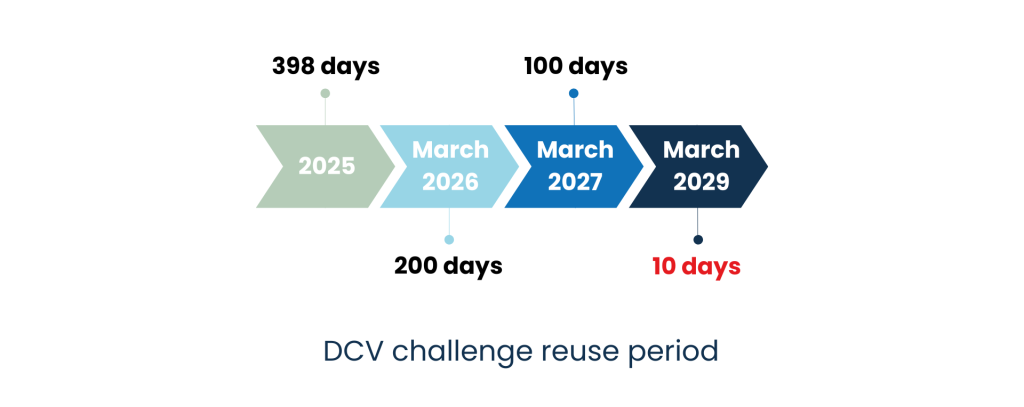
Faced with these major changes coming in 2026, it is essential for businesses to prepare

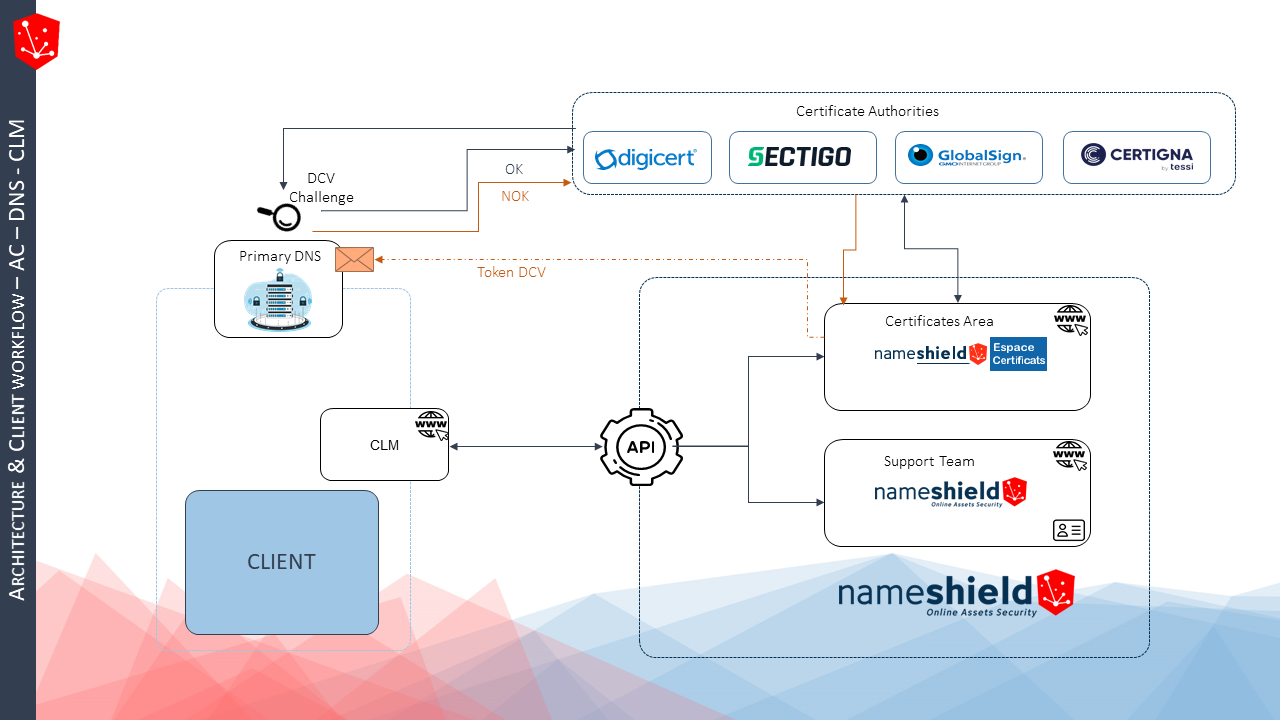
The CA/B Forum’s initiative will gradually transform the digital certificate security landscape. The validity period of SSL/TLS certificates will be reduced, accompanied by stricter DCV challenge validation rules. The key to effective certificate management in the future will therefore lie in automation. With certificates valid for 47 days in 2029, that means nine interventions per year per certificate, making manual management unfeasible. It will therefore be necessary to rely on the following services/software:

  • Certificate provider/Certification Authority (CA): a trusted partner who will assist you with organization and domain authentication issues. The level of service is key to effective management. A multi-CA partner is recommended to limit dependence on a single CA, as demonstrated by the recent difficulties experienced by Entrust.
  • Registrar/Primary DNS: controlling the primary DNS of the domain names listed in the certificates will become key to delivery. Each certificate issue will result in the installation of a TXT or CNAME on the zone(s) concerned. Having an interconnection between the CA and the DNS is essential.
  • CLM editor: the CLM is responsible for inventorying the certificate pool, defining pool management rules, and ensuring complete automation of the ordering process, from CSR generation to certificate deployment on servers. To function, it relies on connectors with CAs or certificate providers.

Preparing therefore means identifying the solutions that suit you best in these three areas and starting to think about the impact on processes, technology and budget, so that you are ideally prepared for the first half of 2026.

Nameshield, an ally to help you manage these changes

Nameshield occupies a unique position in the market as both a registrar and a provider of multi-CA certificates. For over 10 years and on a daily basis, we have been managing all issues related to organization and domain authentication linked to certificates, thanks to our privileged relationship with the largest CAs on the market (Digicert, Sectigo, GlobalSign) and our expertise in DNS for DCV challenge validation. As a result, we issue public certificates almost instantly. Finally, regarding the CLM component, Nameshield has connectors with the largest players on the market to enable you to ensure a complete connection between the various components related to certificate management. We therefore support you in anticipating all the issues mentioned above.

If you have any further questions, you can contact Nameshield directly here.

SSL/TLS certificate duration reduced to 45 days by 2027:Apple takes the first step

On October 9, Apple revealed to the CA/Browser Forum that it had posted a draft ballot for comment on GitHub regarding two important SSL/TLS certificate lifetime events:

  • Gradually reduce the maximum duration of public SSL/TLS certificates to 45 days by 2027;
     
  • Gradually reduce the reuse period for DCV challenges to 10 days by 2027.

In March 2023, in its “Moving Forward, Together” roadmap, Google announced its intention to offer the CA/B Forum a reduction on the maximum possible validity period for public TLS certificates going  from 398 days to 90 days. Since this announcement, the market has been feverishly awaiting for Google’s confirmation but most of all, for the implementation’s timetable… without success. For its part, Mozilla announced, a few weeks ago, its intention to follow Google’s lead on its Firefox browser, without adding any further detail.

Apple ultimately took the first step last week, announcing on October 9th its intention to both reduce the lifetime of certificates to 45 days (when the entire market was expecting 90 days) and to limit the duration of the DCV challenge to 10 days, according to the schedule below. A true bombshell:

Sep-15-2025 => certificates and DCV validation times reduced to 200 days

Sep-15-2026 => certificates and DCV validation times reduced to 100 days

Apr-15-2027 => certificates and DCV validation times reduced to 45 days

Sep-15-2027 => DCV Validation time: 10 days

Information on the background and analysis of this announcement, the expected outcomes and how to prepare for them will undoubtedly be useful:

Context and Analysis:

At this stage, the publication is likely to be commented by market players prior to the formal drafting of the ballot within the CA/B Forum, which itself will be voted on by its members: the Internet browser publishers on the one hand (Google, Mozilla, Apple and Microsoft…) and the Certification Authorities on the other. Amendments are bound to be made, but the general idea remains and the machine is up and running.

Indeed, software publishers are all aligned on the need to reduce the lifetime of certificates, and among Certification Authorities, Sectigo, one of the major players in the certificate industry, is already supporting the initiative. It is likely that things will move rapidly from now on, with few comments and a ballot drafted in the coming weeks or months. We will then know more about the confirmation of the durations and timetable, and will of course make sure to keep you informed.

Expected Outcomes:

  • Certificate lifetime: whether 90 days, 45 days or even less, this reduction is no longer a surprise, and will have a major impact on public certificate portfolio. The certificates can no longer be managed manually. The market has begun its transition to automation, notably through CLMs (Certificate Lifecycle Managers). The issue at stake for companies and organizations will be to rely on partners who can offer as many interconnections as possible between Organizations, Certification Authorities and CLMs.
     
  • DCV challenge duration: Reducing the duration of the DCV challenge to 10 days, if validated, would have a considerable impact, perhaps even more so than reducing the lifetime of certificates. Up until now, the industry has pre-validated domain names for 398 days, using the DCV challenge only once. Apple’s announcement would thus force the use of a DCV challenge for virtually all orders, which would be a major paradigm shift and would involve interconnections with an additional brick in the ecosystem: the DNS. The DCV (Domain Control Validation) challenge involves intervening in the zone of the domain name(s) listed in the certificate, ideally instantaneously, to validate it.
     
  • Organization authentication duration: Apple has not announced anything on the subject of the validity period of organization authentication for OV certificates, which is currently 825 days. However, rumors are circulating that this may be reduced to 398 days or even 365 days.

How to be ready:

The key to successful certificates management lies in automation. A 45 days certificate lifetime represents 9 interventions per year per certificate. Manual management thus becomes utopian. We therefore need to rely on:

  1. Certificate Provider/Certification Authority (CA): a trusted partner who will support through your organizational and domain authentication issues. Service level is key to good management. A multi-CA partner is thus recommended to limit dependence on a single CA, as in the case of Entrust’s recent setbacks. 
     
  2. Registrar / Primary DNS: mastering the primary DNS of domain names listed in certificates will become the key to delivery. Each time a certificate is issued, a TXT or CNAME will be installed on the zone(s) in question. An interconnection between the CA and the DNS is vital.
     
  3. CLM editor: the CLM’s role is to inventory the certificate portfolio, to define certificate portfolio management rules and automate the entire process of orders, from the generation of CSRs to the deployment of certificates on servers. To function properly, the CLM relies on connectors with CAs or certificate suppliers.

Getting ready thus means identifying the most suitable solution, based on these three dimensions, and undertaking this analysis to understand the impacts in terms of process, technology, and budget – in an ideal world – before the end of the first half of 2025.

Nameshield’s approach:

Nameshield holds a unique position in the market as a registrar and supplier of multi-AC certificates. For over 10 years, we have been managing the day-to-day issues associated with authenticating organizations and domains using certificates. On the one hand, we have a privileged relationship with the biggest CAs on the market (Digicert, Sectigo, GlobalSign), and on the other, we master the DNS brick for DCV validation. As a result, we can issue public certificates almost instantaneously. Last but not least, Nameshield has connectors with the major players in the CLM market, allowing you to ensure a comprehensive connection between the various components involved in certificate management. This way, we can support you in anticipating all the issues mentioned above.

SSL/TLS certificate duration reduced to 45 days by 2027:Apple takes the first step

For more information, please contact our Sales team or our Certificates team.

BIMI and VMC: display your logo with emails

BIMI and VMC: display your logo with emails

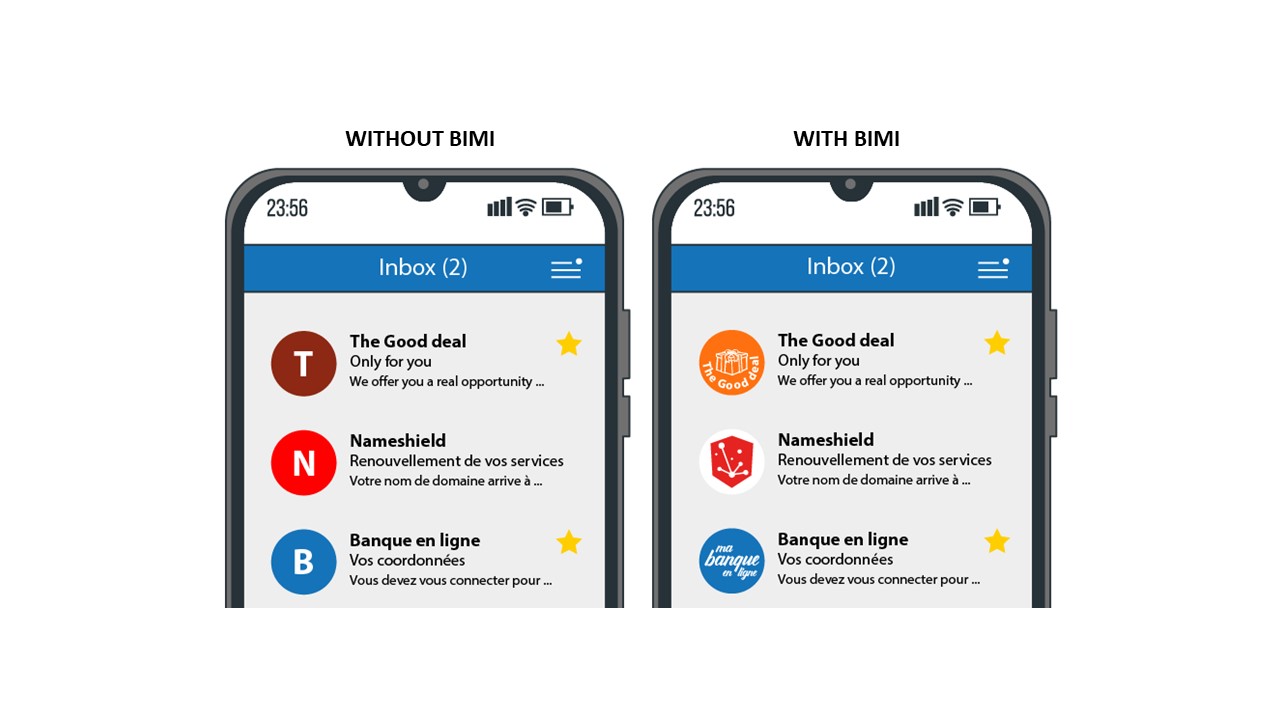
BIMI (Brand Indicators for Message Identification) allows you to authenticate your emails and reinforce the trust of your customers by displaying your logo in their inbox. VMC (Verified Mark Certificate) is a certificate associated with BIMI, which ensures the authenticity of the logo displayed.

BIMI - Nameshield

What is BIMI?

BIMI is an industry initiative aimed at standardizing the use and display of brand logos in email clients. By placing a brand or company logo next to an email, it is more easily identifiable by customers and users, builds a sense of legitimacy and trust, significantly impacts open rates, and increases consumer protection against fraudulent emails.

Technically speaking, BIMI is an emerging security technology that works alongside DKIM, SPF and DMARC protocols to protect your domain name from being used by malicious actors to send fraudulent emails.

Before BIMI, the steps to get your logo next to an email were specific to each email service your message was sent to. Sometimes the process was entirely manual or relied on other applications to aggregate your brand information and share it across participating platforms.

The AuthIndicators group, which includes email service providers such as Google, Verizon Media, IONOS by 1&1 and Fastmail, is working to implement BIMI in the most common email clients. Many players have already adopted BIMI, others are in the process, Microsoft’s and Apple’s positions are expected to drive final adoption of the standard.

Why is BIMI important?

To complete the arsenal of a brand’s protection on the Internet, more specifically against hijacking attempts through fraudulent spoofing emails whose goal is to deceive the user and lead them to phishing sites.

306 billion emails circulated worldwide in 2020, with an ever-increasing proportion of fraudulent emails hijacking brands.

To increase the desirability of emails, particularly in marketing campaigns. The implementation of BIMI and more widely of security protocols and certificates on the domain name associated with a brand is essential today and has a major impact on online reputation.

Because it is becoming a market standard, easy to implement unlike the number of existing anti-fraud email solutions that are often difficult to test and implement.

How does BIMI work?

BIMI uses a process of several steps to validate emails by ensuring that they are actually associated with the sender’s domain name. Senders must add a TXT DNS record dedicated to BIMI.

For BIMI to work, domain names must also have several other fraud protections, including:

  • SPF (Sender Policy Framework): authenticates emails by identifying mail servers authorized to send from specific domain names ;
  • DKIM (DomainKeys Identified Mail): adds a digital signature to each email to verify that it was sent from an authorized domain name;
  • DMARC (Domain-Based Message Authentication, Reporting, and Conformance): confirms SPF and DKIM records and specifies how non-compliant emails should be handled.

When emails are sent using BIMI, the receiving mail server will first do the standard DMARC/DKIM authentication and SPF validation. If the email passes these checks, the mail server will verify that it has a valid BIMI record and display the brand logo.

How does BIMI interact with DMARC, DKIM and SPF?

The first step towards using BIMI to display a logo is to implement DMARC. This is stored as a DNS record of TXT type on the domain name. For DMARC to work with BIMI, the reject policy in this record must be p=quarantine or p=reject for all emails sent from your domain.

BIMI requires DMARC… and DMARC requires your domain name to have DKIM records to work. While DMARC only requires SPF or DKIM to work, it is best to include SPF records for more security when using BIMI. These 2 security tools are also stored as TXT DNS records in the domain name zone.

VMC, the final link in the chain

A Verified Mark Certificate is a digital certificate that authenticates the ownership of a logo, and completes the use of BIMI in email clients such as Gmail.

The VMC certificate guarantees the authenticity of the logo displayed, which is necessarily owned by the domain name holder sending the email. It is the last link in the chain to guarantee the authenticity of the email received.

When you send an email to a contact, the receiving mail server that manages their inbox will take the URL of the tag that indicates where the logo should be displayed. It will then check the VMC certificate to ensure that the correct logo is used. Once the logo is verified by the VMC, BIMI will display it next to the email in the inbox.

To obtain a VMC certificate, the implementation of DMARC on the domain name is a prerequisite. Then follows a reinforced authentication process with a Certification Authority that will validate the identity of the Organization, the registration of the logo with a certified body and will issue the certificate after a one to one meeting with a notary.

Depending on the country, the intellectual property offices for logos registrations may vary as well as the rules of acceptance to issue the certificate. The notions to keep in mind, the authorized trademarks can be:

  • Design trademarks: consist exclusively of a design;
  • Verbal trademarks: contain words, letters and/or numbers, without any particular font, size, color or style;
  • Combination trademarks: include a combination of words with a design, stylized letters or numbers.

While this is not a requirement for implementing BIMI on your domain name at this time, VMC should be part of the standard in the future.

Entrust Datacard and DigiCert are the first 2 companies to issue VMC certificates for the BIMI standard. Nameshield is a partner of both companies and will assist you in obtaining VMC certificates. You can contact directly our certificates department for any question on the subject.

BIMI + VMC = Guarantee of authenticity

BIMI, VMC… and Nameshield

Nameshield now assists its customers in all aspects of the implementation of DMARC, SPF, DKIM, but also BIMI protocols and the obtaining of associated VMC certificates. The domain name is at the core of the implementation of these different protocols. Our historical business as a registrar and DNS zones manager allows us today to assist our customers on these major subjects of the fight against online fraud and the increase of emails desirability.

Firefox 83 launches HTTPS-Only mode

On November 17, Mozilla released the version 83 of the Firefox browser, promising improved performance in terms of page loading and browsing responsiveness, as well as a significant reduction in the memory used.

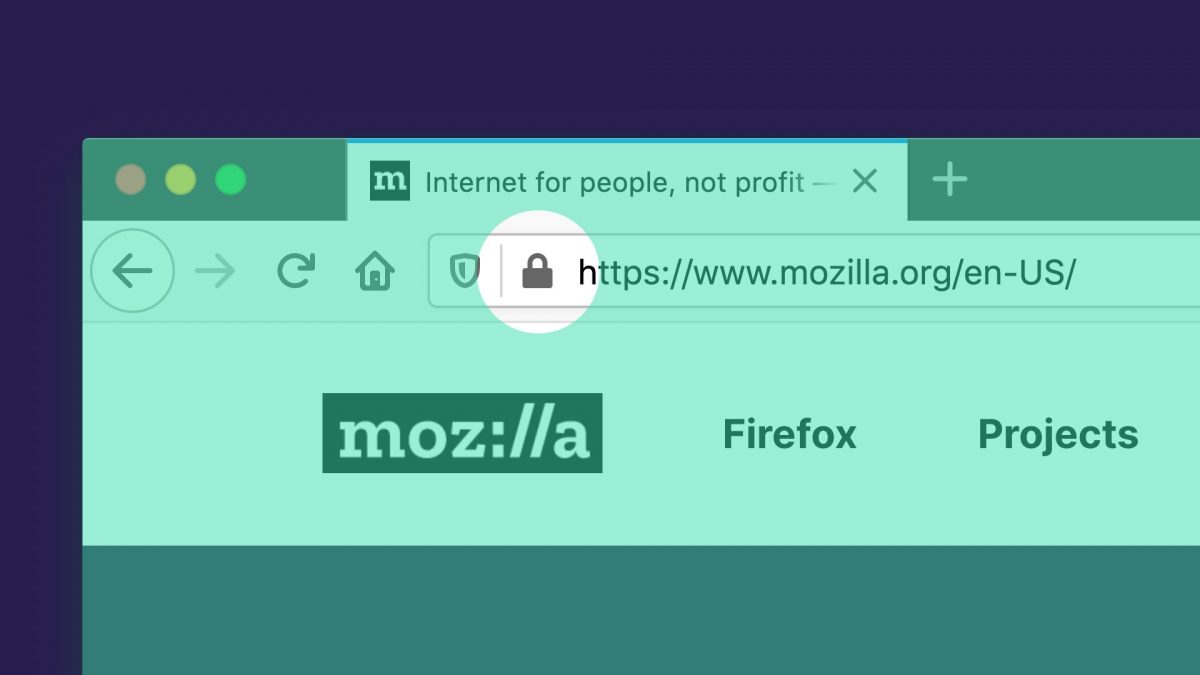
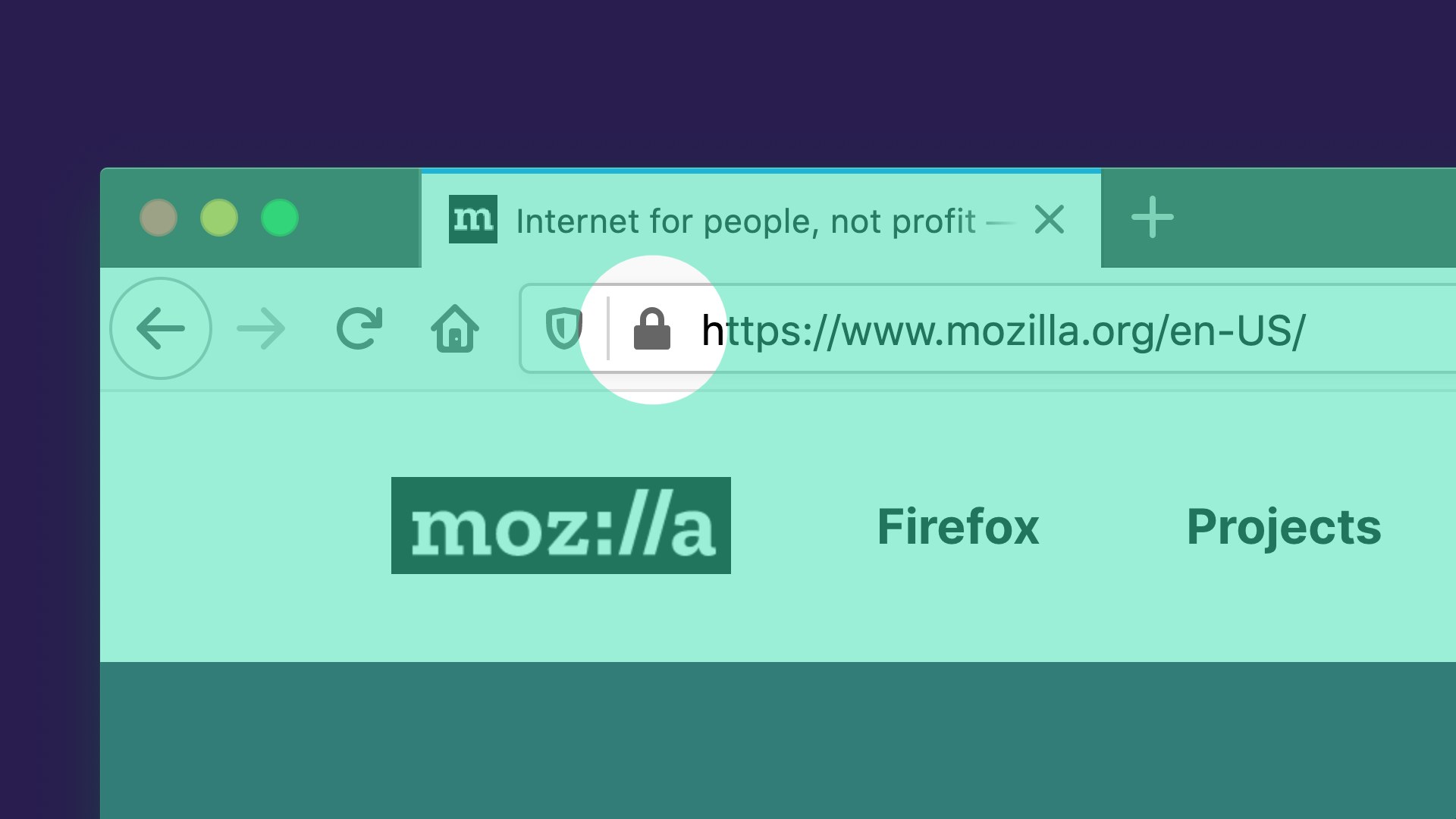
But above all, Mozilla introduces a brand-new security feature to the small world of browsers, an “HTTPS-Only Mode” option to limit browsing to secure HTTPS* connections only.

Firefox 83 launches HTTPS-Only mode
Image source: Mozilla Security Blog

Mozilla is pushing it further regarding the desire of major browsers to pass HTTPS as the default browsing protocol instead of the unencrypted and therefore fully visible HTTP.

Which display during browsing?

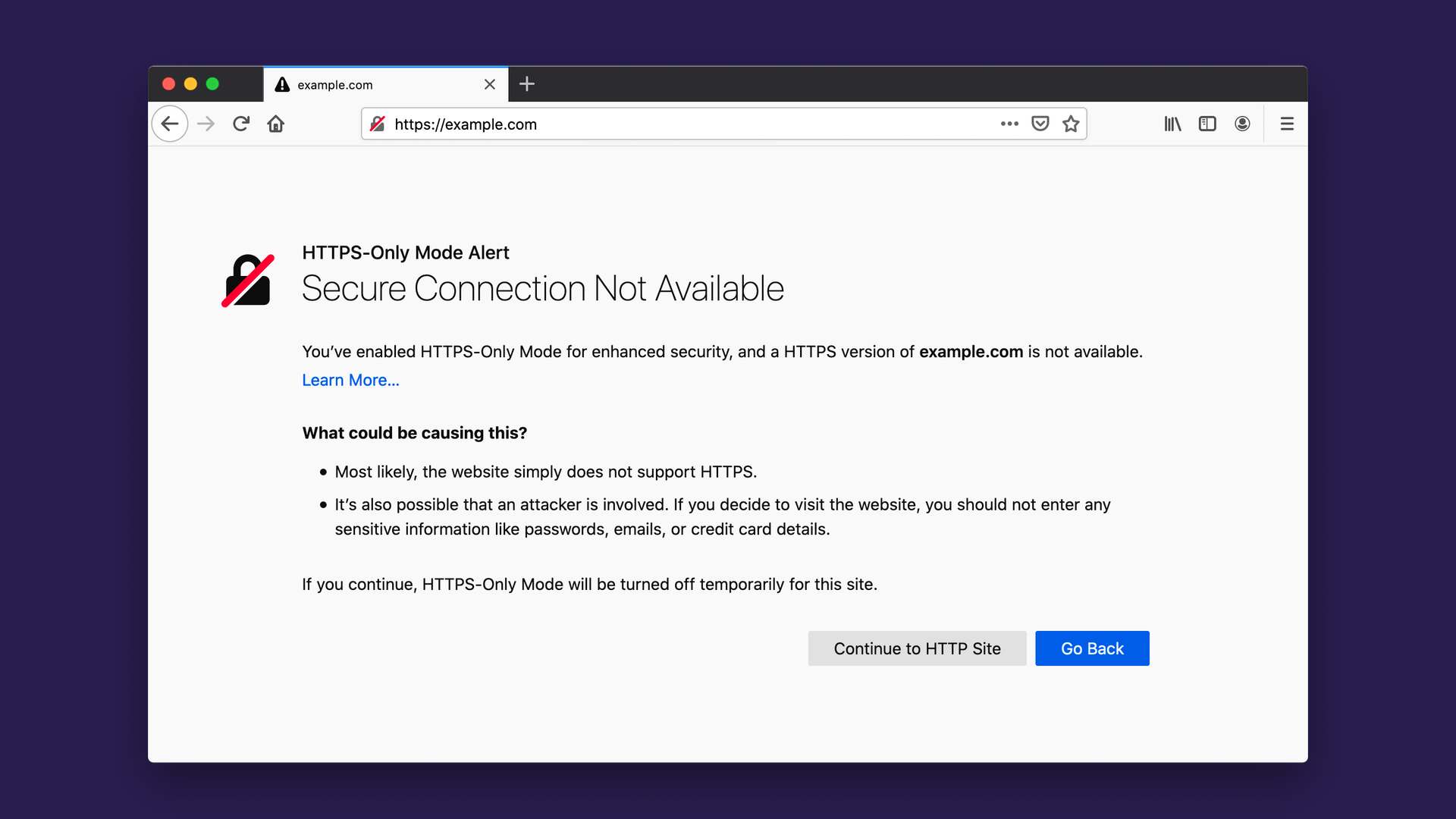
When the option is activated, any web page that does not have an SSL/TLS certificate (allowing the HTTPS and the security padlock icon to be displayed in the browser address bar) will be preceded by the warning message below, which is restrictive for web users.

Firefox 83 launches HTTPS-Only mode
Image source: Mozilla Security Blog

What to expect in the coming years?

If the option is not yet activated by default, Mozilla’s management indicates that it expects HTTPS to become the standard for browsing the Web. Driven by the successive evolutions of browsers and their increasingly obvious displays of a lack of security, more and more websites are migrating to HTTPS by default. It is likely that browsers makers will decide to completely depreciate HTTP connections in the near future, making HTTPS the default protocol for Web browsing.

How can companies be prepared?

Most companies have already begun the migration of their website(s) to the HTTPS by default. It is important to maintain an exhaustive inventory of the company’s websites and pages and to control the associated SSL-TLS certificates, of which the main risks are renewal errors and poor implementation. It is essential to set up clear procedures and to associate to them a good communication towards the interlocutors in charge of the websites. Actors such as Nameshield are there to accompany you in this process. They have the expertise and tools necessary to simplify these tasks and reduce the risk of error.

The dangers of Wildcard certificates

wildcard certificate - TLS/SSL certificates
Image source: skylarvision via Pixabay

TLS/SSL certificates are used to authenticate servers (mostly Web) and encrypt traffic between websites and users. Thus, they ensure the integrity of the data exchanged and prevent data spying. The digitalization of the company and the world in general, as well as the browsers’ desire to impose HTTPS:// by default, have multiplied exponentially the need for certificates.

To meet these growing needs, the wildcard certificate (*.domainname.com) is increasingly being considered by companies. While it has some advantages, particularly in terms of costs reduction and flexibility, it is important to be aware of the disadvantages in order to choose the right certificate wisely. A brief overview of the wildcard certificate.

What is a wildcard certificate?

A standard TLS certificate secures an explicit host name (CN for Common Name or FQDN for Fully Qualified Domain Name) defined in its metadata. For example, Google holds a certificate for mail.google.com.

  • This certificate is only valid for: https://mail.google.com/
  • It cannot be used for: https://google.com/ – https://images.google.com/ – https://my.mail.google.com/

In other words, the host name must be an exact match. If you try to use this certificate on https://my.mail.google.com/ you will get a certificate error from your browser.

A TLS wildcard certificate is different. As its name implies, it uses a generic match rather than an exact match. This generic match is represented by “*” in the CN and covers all subdomains of the same level. Example with the *.google.com certificate.

  • This certificate is valid for: https://mail.google.com/ AND https://images.google.com/ as well as all possible subdomains of google.com.
  • It cannot be used for: https://google.com/ (without subdomain) or https://my.mail.google.com/ (the subdomain level is not the same).

The practical side of the wildcard certificate?

In some situations, the wildcard certificate is very useful. A host that proposes websites for different clients, hosted on a shared server, and accessible through different subdomains… client1.mysite.com, client2.mysite.com, client3… It is less practical, technically more complicated and de facto more expensive to ask for a new certificate for each client that registers; the simplest option is a wildcard certificate for *.mysite.com, a unique certificate that will cover all clients. The case is identical for a company that wishes to access its websites through FQDN derived from the same domain and hosted on the same web server, *.mycompany.com. So far, everything is okay.

But then, what is the risk?

In the cases above, all sites are hosted on a single server. In large companies, or for major websites, hosting is often more complex and on different servers. Let’s take again our example of Google with images.google.com and mail.google.com, these two applications are linked to different services of the company, hosted on different servers and managed by different technical teams. This kind of organization is extremely frequent in the company. And this is where the security of wildcard certificates stops.

The problem with wildcard certificates, and to a lesser extent with certificates containing multiple entries (the famous SAN, Subject Alternative Names), comes from the fact that they are deployed on several servers. Indeed, to ensure the security of a TLS/SSL certificate, it is absolutely necessary to protect the private key associated with the certificate. Ideally, it should be stored in a vault or in a HSM. When a certificate is installed on several servers, the associated private keys circulate, increasing the exposure to the risk of compromise.

Case of a compromised certificate

In case of a compromised certificate, or an error on the certificate (renewal problem), it is recommended to intervene quickly to limit the damage caused. Application for a new certificate (or renewal), installation of the new certificate and, if necessary, revocation of the compromised certificate.

In our example of creating websites on a single server, this is not a problem. We have only one server, it has been compromised, the stolen/expired/compromised certificate only works for this one server; we have limited the damage as much as possible.

In a “several servers” scenario, if the certificate of only one of the servers is affected, it becomes compromised on all of the servers, which will have consequences on all of them and require a much wider intervention to repair the damage, most often in an emergency, and assuming that all of the affected servers are identified. Indeed, it is not uncommon for the certificate to circulate within several teams and to be installed without being listed on a certain number of servers. The impact can be important.

Taking our example of Google. Let’s imagine that only the images.google.com server has been hacked and that mail.google.com has not been affected. The certificate for images.google.com being a wildcard certificate for *.google.com which is common to mail.google.com, the cyber-attacker having compromised the images service has by rebound usurped the identity of the mail.google.com server and can intercept the traffic of the mail service while this server has never been hacked!

Good practice: one TLS/SSL certificate per server…

In our last example, if we were to have two certificates instead of one, with each server having only access to its own certificate, we would have limited the risk. In an ideal world, each certificate should only be used for one server (or a homogeneous cluster of servers). Different services on different servers should have their own certificates, generally not wildcard certificates.

A wildcard can be used if you have a lot of host names, of subdomain type, pointing to the same service on the same server. Be careful however that this generic certificate does not also cover host names pointing to other servers, in which case each service should have its own certificates.

Lastly, if you have a few host names pointing to single servers and everything else on a single service, then it is better to disassociate the host names. For example, you may have a certificate for login.mysite.com and a (wildcard) certificate for *.clients.mysite.com. On this last example, if the number of clients is fixed or clearly defined, it is better to go for a certificate with a precise SAN list, to better control secure host names and not allow the httpS:// on uncontrolled host names.

Conclusion

The option of a wildcard certificate exists and it is a good thing for some very specific needs. But in practice, there should never be a need to install a wildcard certificate, nor should the same certificate be installed on different servers not built in cluster.