DNSSEC: Nameshield adopts ECDSA

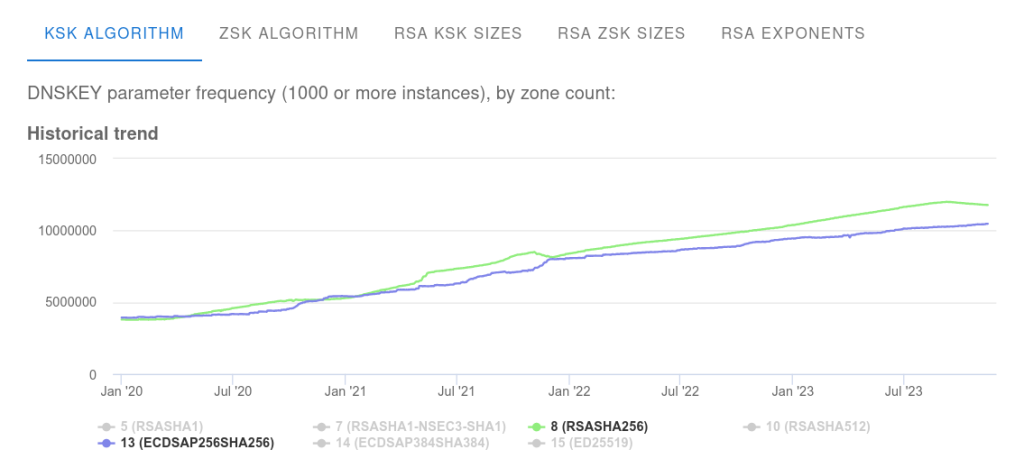
DNSSEC is the protocol that guarantees the integrity of DNS resolution by establishing a chain of trust all the way back to the root. Data security is ensured by a mechanism of cryptographic keys that sign DNS zone records. Historically, DNS operators have used RSA keys (RSASHA256 algorithm), renowned for their robustness.

As an alternative to this asymmetric cryptographic algorithm, there are elliptic curve algorithms. In the case of DNSSEC, the “ECDSA Curve P-256 with SHA-256” algorithm (RFC 6605 and 8624) offers a higher level of security with smaller key sizes.

The ECDSA algorithm is increasingly being implemented by major players in the domain names industry, such as Verisign and AFNIC, and aims to become the standard.

This has several advantages over our current implementation:

  • Smaller signatures and smaller zone files (approx. -33%);
  • Faster zone transfer and reload;
  • Improved signing performance;
  • Potentially faster DNS requests (less reliance on IP fragmentation);
  • Reduced amplification factor of DDoS attacks based on DNS.

For all these reasons, Nameshield has chosen to use this algorithm by default to secure its own domain names and those of its customers.

Image credit : Nameshield with storyset.com

Phishing, slamming and other fraudulent e-mails: Stay alert during the end-of-year holidays!

Phishing, slamming and other fraudulent e-mails: Stay alert during the end-of-year holidays!

The end-of-year holidays often announce the upsurge of fraudulent mass e-mails campaigns. Indeed, cybercriminals take advantage of this period, when vigilance can be particularly low, to launch phishing e-mails.

What are phishing and slamming?

Phishing is used by cybercriminals to obtain personal information in order to commit an identity theft.

In the world of phishing, slamming is a well-known variant that consists in encouraging domain names holders to renew their annuity with another registrar, by arguing the emergency and criticality of the concerned name’s loss. Concretely, this is an e-mail pushing its recipient to contract an unsolicited service and to proceed to the payment of this latter without delay.

Thus, the slamming may take the form of a fraudulent renewal invoice, usually associated with intimidating terms like “Expiration notice”. Under the pressure of such e-mail, generally well built, it happens that the recipient then proceeds to the payment and finds himself debited with an important amount for the so-called renewal.

In the same way, the slamming e-mail may also indicate that a “customer” of the sender, posing as a fake registrar, intends to register domain names identical or similar to your brand. Then the fraudster proposes to register them for you in order to protect you from these troublesome registrations, of course, in exchange for an urgent payment.

Another kind of attack, the suspicious e-mail attachment!

Be careful of fraudulent e-mails with infectious attachments: a single entry point is enough to destroy a network!

The aim of a trap and thus malicious attachment is to pose as a legitimate file (PDF, Word document, JPG image…), while hosting and hiding a malicious code: this is what we generally call Trojans.

Some simple rules to protect against them

  • Always stay alert when someone asks you your personal data;
  • Do not ever open an attachment from an unknown sender, or from one who is not entirely trustworthy;
  • Check the links by hovering the cursor over them (without clicking) to ensure that they link to trustworthy websites;
  • Never reply under the pressure of this kind of solicitation and of course do not proceed to any payment;
  • If there is any doubt, do not reply to the e-mail and contact the sender through another method who will confirm whether it really is a fraud attempt or not.

To remind you of this more often, you can find a wallpaper to download on the Nameshield website:

New e-mails authentication requirements from Google and Yahoo

New e-mails authentication requirements from Google and Yahoo - DMARC

Google and Yahoo recently announced significant changes to their e-mails authentication requirements. The aim of these adjustments is to strengthen the security of online communications, a major issue in the current context of cybercrime.

The two giants are emphasizing the adoption of advanced authentication protocols, in particular DMARC (Domain-based Message Authentication, Reporting, and Conformance). DMARC relies on the existing SPF and DKIM standards, providing a robust method for verifying e-mails’ authenticity and reducing the risk of identity theft and phishing.

To implement these new requirements, Google and Yahoo will adjust their algorithms to give priority to e-mails from domains that have correctly implemented DMARC. The aim of this measure is to improve the deliverability of authenticated e-mails, reinforcing users’ trust in the security of their e-mail inboxes.

The new guidelines will apply from February 1, 2024 to all senders who send more than 5,000 emails per day. They underline Google and Yahoo’s commitment to fight against online threats, in particular phishing, a common method used by cybercriminals to deceive users and gain access to their sensitive information. By adopting stricter e-mails authentication requirements, these companies are strengthening users’ protection against malicious attacks.

It is now essential for domains holders and players in the digital world to comply with these new guidelines, in order to contribute to the creation of a safer and more secure Internet for all.

Nameshield’s experts are at your disposal to assist you in deploying this protocol.

DNS and HTTP(S) redirects – How do they work together?

In the world of websites and domain names, it is common to want to redirect the use of a domain name to another – e.g. in the address bar of a browser – to access a website. For example:

  • Redirect a-great-website.com to www.a-great-website.com
  • Redirect www.to-be-redirected.com to www.a-great-website.com

However, it is not always easy to understand how all of this works, nor how to configure these redirects. Do I have to configure redirection at DNS level? At my web server level? Both? One or the other?

The purpose of this article is to detail the distinction between DNS «redirect» and HTTP redirect, and to present how these two protocols work together.

In the rest of the article, we will not distinguish between HTTP and HTTPS (HTTP protocol secured by a certificate). Everything that is said here is valid for both.

Understanding the difference between DNS and HTTP

DNS and HTTP are two internet protocols that are both essential to the proper functioning of the web, but do not have the same purpose.

Let’s take the example of a user who wants to access blog.nameshield.com. He enters blog.nameshield.com in the address bar of his favorite browser.

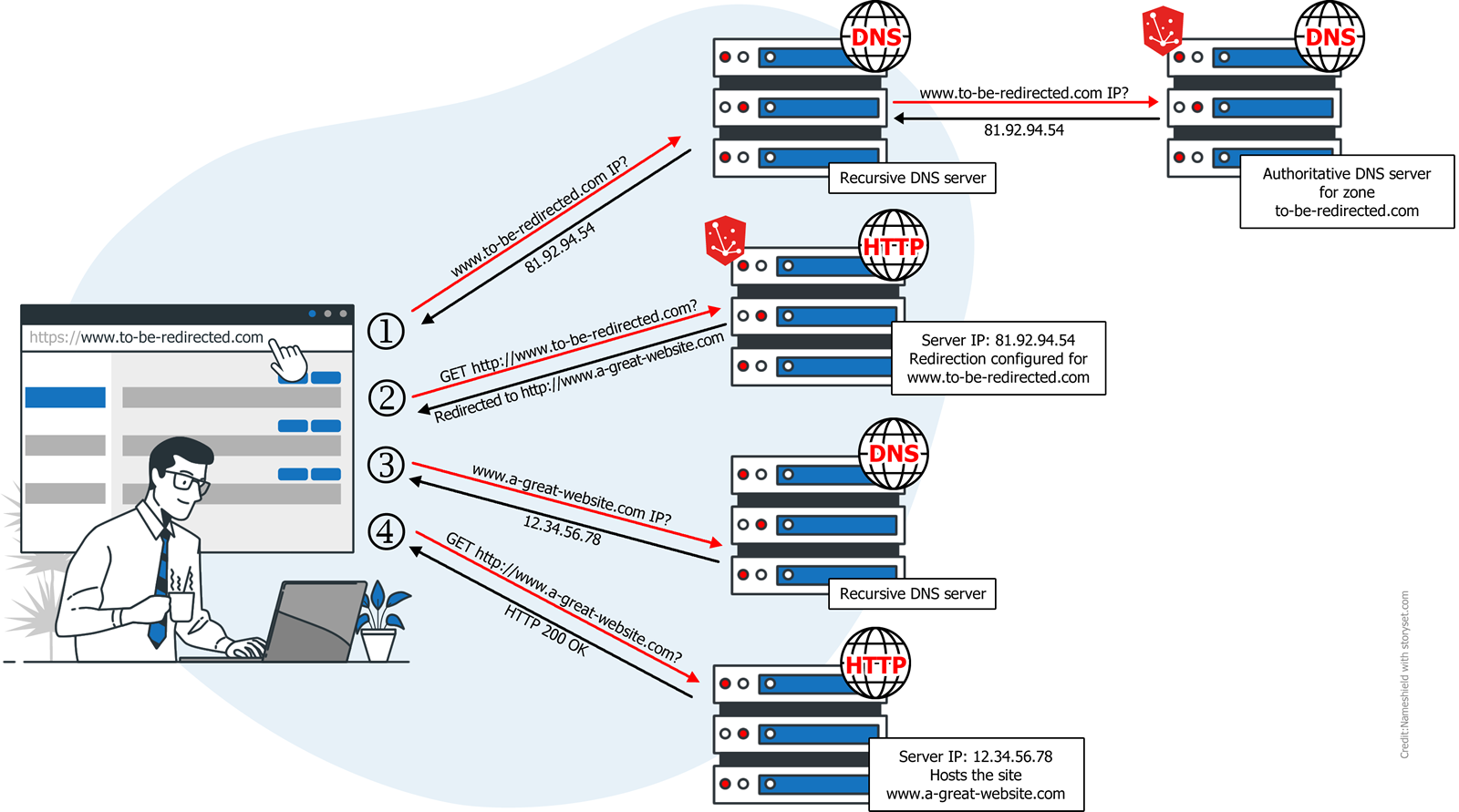
  1. Before the browser can send a request to obtain the content of the website’s home page, it must know to which IP address it must send the request. This is where DNS comes in. The browser sends a DNS query (using DNS protocol) to a resolver: «Give me the IP address associated with blog.nameshield.com». It gets back an IP address (81.92.84.102) configured on an authoritative DNS server. We’re talking about the resolution of the blog.nameshield.com domain name.
  2. The browser can then send the HTTP request (using HTTP protocol) to the HTTP server (or web server) whose IP address it has just obtained: «Give me the content of the web page blog.nameshield.com». In return, it receives the content of the page to display.

The DNS protocol offers types of records that allow to «redirect» one domain to another: especially the CNAME type. Although DNS “redirect” is easily referred to, the term “alias” is more appropriate. Strictly speaking, this does not redirect, but indicates that the domain we are resolving is an alias of another domain. You must then resolve this other domain to obtain the IP address you are looking for.

Let’s say we want to create a redirect from www.to-be-redirected.com to www.a-great-website.com. If we configure the DNS zone of to-be-redirected.com with a CNAME record of this type: www.to-be-redirected.com CNAME www.a-great-website.com, that basically means : “You want to know the IP address associated with www.to-be-redirected.com? Well, look for the one associated with www.a-great-website.com and you’ll get your answer.” Another DNS query will be sent to resolve www.a-great-website.com and obtain the IP address. The browser will have the IP address of the HTTP server we are interested in (the one hosting the website www.a-great-website.com), but this will not change the content of the HTTP request sent by the browser: “Give me the content of the web page www.to-be-redirected.com”.

You may notice that the HTTP request sent by the browser contains the name of the website (or host – here www.to-be-redirected.com) that you want to access. Indeed, a single server (and therefore a single IP address) can host dozens of different websites. It will only respond positively to HTTP requests containing a host for which it is configured. Knowing the IP address of the web server is not enough, one must also address an HTTP request to which it is able to respond. Sending a request http://www.to-be-redirected.com to some server configured only to respond to http://www.a-great-website.com will not work!

The HTTP protocol also offers a redirection system (here it is the appropriate term). An HTTP server can be configured to redirect one host to another. For example, if it receive HTTP requests “Give me the content of the web page www.to-be-redirected.com.”, it will answer “This resource is redirected to http://www.a-great-website.com.” Then the browser will repeat the following steps:

  1. DNS lookup of www.a-great-website.com
  2. Send a request http://www.a-great-website.com to the IP address obtained
  3. Display the web page obtained

How to make DNS and HTTP redirects work well together?

Let’s recap:

  • DNS is used to resolve a domain name to obtain an IP address.
  • HTTP requests are sent to an IP address, and contain the host of the website you want to access.
  • HTTP servers can return different contents depending on the host present in the request: a web page they host, a redirect for which they have been configured, or an error if the host is unknown to them.

So, to make a redirect work correctly (still using the same example), you must have:

  • A DNS record in the to-be-redirected.com zone to associate the www host with the IP address of a web server…
  • …web server on which a redirect from http://www.to-be-redirected.com to http://www.a-great-website.com must be configured.

How Nameshield can help you

Nameshield offers an HTTP (and HTTPS) redirect service that simplifies the configuration of these redirections, which you can use from the moment Nameshield is the DNS provider of your domain to be redirected. Simply go to the technical configuration interface of your domain name, then in the tab «HTTP redirections». You can then create a new redirect on the host of your choice, specifying various parameters (such as the repercussion of directories and query parameters). Our system will then automatically:

  • Update the DNS zone to add records (A/AAAA or CNAME depending on the host) to point to the IP address of the Nameshield HTTP redirect server. In the zone configuration interface, a dedicated icon makes it easy to distinguish these automatically added records.
  • Configure a new redirect on our HTTP server (with an anycast architecture if you have a premium offer) according to the requested parameters.

Your redirect is then operational, you have nothing more to do. No changes are necessary with your web hosting provider.

If you want to change the destination of an existing HTTP redirect, you just have to modify the existing redirection from the same interface (no need to delete it and then to create a new one). No changes are expected on the DNS, since the host already points to our HTTP redirect server. Our system will modify the HTTP server configuration, and your new redirect will be effective in a few minutes.

If you have any questions about this article, please contact your customer support team.

.FR: Increased unaided awareness among French VSEs and SMEs

In October 2023, Afnic, the French Association for Cooperative Internet Naming, which manages the .fr domain, carried out a survey on the perception of .fr among 502 tradespersons, retailers or VSE/SME managers selected on the basis of company size. Here are the results of the survey:

  • For 70.9% of French VSEs and SMEs, the .fr extension is spontaneously cited, that’s 6.2 points more than in 2022, ahead of .com (69.1%) and .org (20.5%).
  • 61% of French VSEs and SMEs consider that .fr has a very good reputation (that’s 11 points higher than .com) and 38% consider it to have a fairly good reputation.
  • And finally, for 88% of French VSEs and SMEs, .fr is perceived as the extension that enables them to promote French expertise in France and abroad.

For more information and to register your .FR domain name, don’t hesitate to contact a Nameshield consultant.